








Use Airscale's built-in company search to discover target businesses based on size, industry, location, and other firmographic criteria. This native feature helps you build comprehensive company lists for account-based prospecting and market research
Use Airscale's built-in company search to discover target businesses based on size, industry, location, and other firmographic criteria. This native feature helps you build comprehensive company lists for account-based prospecting and market research
Note
You can import up to 1 000 companies per search
Large searches may take several minutes to complete
Use specific filters to get the most relevant companies within the limit
Note
You can import up to 1 000 companies per search
Large searches may take several minutes to complete
Use specific filters to get the most relevant companies within the limit
An active Airscale account with remaining credits
Clear understanding of your ideal customer profile (ICP)
Specific criteria for your target companies (industry, size, location, etc.)
An active Airscale account with remaining credits
Clear understanding of your ideal customer profile (ICP)
Specific criteria for your target companies (industry, size, location, etc.)
Log into your Airscale dashboard
Select "Find companies" from the available modules (look for the Airscale icon)
Log into your Airscale dashboard
Select "Find companies" from the available modules (look for the Airscale icon)
Note
The Find Companies module is Airscale's native search engine, so you don't need any external URLs or account connections
Note
The Find Companies module is Airscale's native search engine, so you don't need any external URLs or account connections

Configure your search criteria using the comprehensive filter system:
Basic company filters
Location targeting:
Include country, state, or city: Enter geographic filters like "United States," "California," or "San Francisco"
Multiple locations can be added for broader coverage
Use specific cities for territory-based targeting
Company industries:
Select from dropdown of industry categories
Multiple industries can be selected
Focus on industries where your solution has proven success
Company size:
Choose from predefined ranges: 1-10, 11-50, 51-200, 201-500, 501-1000, 1001-5000, 5001-10000
Select multiple ranges for broader targeting
Consider your product's sweet spot for company size
Advanced growth and financial filters
Company size growth:
Set minimum and maximum growth percentages
Target companies experiencing specific growth rates
Filter for rapidly expanding businesses or stable enterprises
Company revenue:
Set minimum and maximum revenue in millions
Target companies within specific revenue ranges
Align with your solution's typical customer spend capacity
Company signals:
Select from dropdown of buying intent and behavioral signals
Target companies showing signs of growth, hiring, or technology adoption
Focus on businesses likely to be in market for your solution
Department-specific filters
Company department count:
Select specific departments (Sales, Marketing, Engineering, etc.)
Set minimum and maximum employee counts within those departments
Target companies with mature departments in your focus area
Company department growth:
Choose specific departments experiencing growth
Set minimum and maximum growth percentages for those departments
Identify companies actively hiring in relevant areas
Advanced keyword targeting
Keywords filter: Use sophisticated keyword combinations to find companies with specific business models or strategies:
Business model examples:
freemium AND self-serve AND PLG(Product-Led Growth companies)subscription AND SaaS AND upselling(SaaS businesses)shopify AND DTC AND ecommerce(Direct-to-consumer brands)
Go-to-Market strategy examples:
(cold email OR cold call) AND B2B AND outbound(Outbound sales focus)(ABM OR demand gen) AND enterprise(Account-based marketing)
Technology focus examples:
AI AND chatbot AND customer support(AI customer service)fintech AND KYC AND compliance(Financial technology)logistics AND warehouse AND last mile(Supply chain/logistics)
Sustainability examples:
sustainability AND green energy AND carbon(Green technology)
Configure your search criteria using the comprehensive filter system:
Basic company filters
Location targeting:
Include country, state, or city: Enter geographic filters like "United States," "California," or "San Francisco"
Multiple locations can be added for broader coverage
Use specific cities for territory-based targeting
Company industries:
Select from dropdown of industry categories
Multiple industries can be selected
Focus on industries where your solution has proven success
Company size:
Choose from predefined ranges: 1-10, 11-50, 51-200, 201-500, 501-1000, 1001-5000, 5001-10000
Select multiple ranges for broader targeting
Consider your product's sweet spot for company size
Advanced growth and financial filters
Company size growth:
Set minimum and maximum growth percentages
Target companies experiencing specific growth rates
Filter for rapidly expanding businesses or stable enterprises
Company revenue:
Set minimum and maximum revenue in millions
Target companies within specific revenue ranges
Align with your solution's typical customer spend capacity
Company signals:
Select from dropdown of buying intent and behavioral signals
Target companies showing signs of growth, hiring, or technology adoption
Focus on businesses likely to be in market for your solution
Department-specific filters
Company department count:
Select specific departments (Sales, Marketing, Engineering, etc.)
Set minimum and maximum employee counts within those departments
Target companies with mature departments in your focus area
Company department growth:
Choose specific departments experiencing growth
Set minimum and maximum growth percentages for those departments
Identify companies actively hiring in relevant areas
Advanced keyword targeting
Keywords filter: Use sophisticated keyword combinations to find companies with specific business models or strategies:
Business model examples:
freemium AND self-serve AND PLG(Product-Led Growth companies)subscription AND SaaS AND upselling(SaaS businesses)shopify AND DTC AND ecommerce(Direct-to-consumer brands)
Go-to-Market strategy examples:
(cold email OR cold call) AND B2B AND outbound(Outbound sales focus)(ABM OR demand gen) AND enterprise(Account-based marketing)
Technology focus examples:
AI AND chatbot AND customer support(AI customer service)fintech AND KYC AND compliance(Financial technology)logistics AND warehouse AND last mile(Supply chain/logistics)
Sustainability examples:
sustainability AND green energy AND carbon(Green technology)
" transform="translate(4 1)" width="8px"/></svg>)
Pro Tip
You can only export 2,500 leads per search
Start with broader filters and narrow down based on preview results. You can always refine and re-search.
You don't need to press enter when typing keyword combinations. Just type the keywords and Boolean operators directly (AND/OR).

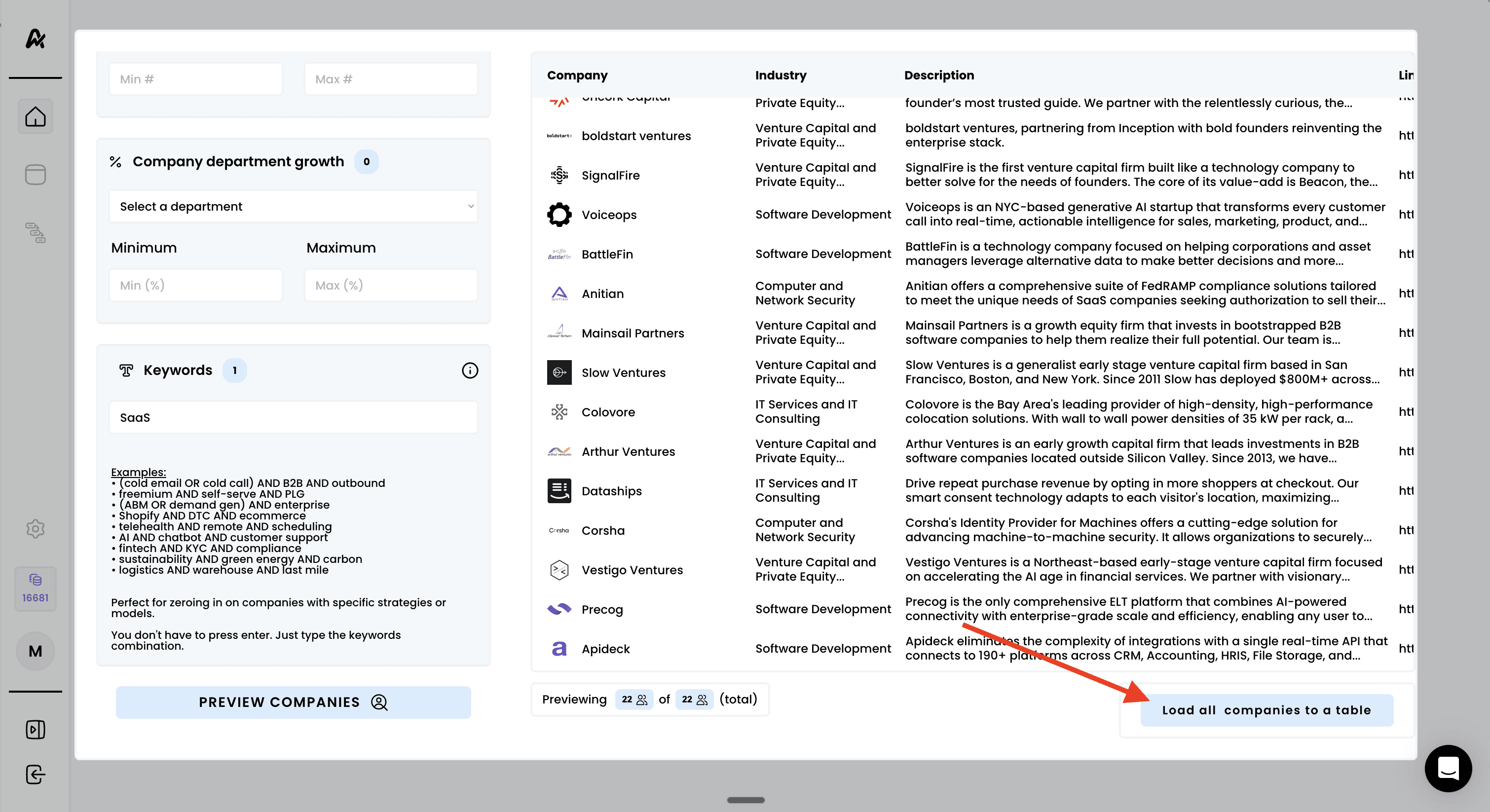
Click "PREVIEW COMPANIES" to see a sample of your search results
Review the preview data:
Company names: Check if businesses match your target market
Industry classifications: Verify industry relevance to your solution
Company descriptions: Review business models and focus areas
LinkedIn profile URLs: Validate company authenticity and presence
Check the results summary:
Total number of matches
Quality of matches against your ICP
Distribution across industries and business models
Refine filters if needed:
Adjust keyword combinations based on company descriptions
Modify industry selections for better targeting
Update size or revenue ranges based on company profiles
Fine-tune growth criteria for ideal timing
Click "PREVIEW COMPANIES" to see a sample of your search results
Review the preview data:
Company names: Check if businesses match your target market
Industry classifications: Verify industry relevance to your solution
Company descriptions: Review business models and focus areas
LinkedIn profile URLs: Validate company authenticity and presence
Check the results summary:
Total number of matches
Quality of matches against your ICP
Distribution across industries and business models
Refine filters if needed:
Adjust keyword combinations based on company descriptions
Modify industry selections for better targeting
Update size or revenue ranges based on company profiles
Fine-tune growth criteria for ideal timing
Warning
Ensure the preview shows relevant companies before importing. Poor preview results indicate filters need adjustment
Warning
Ensure the preview shows relevant companies before importing. Poor preview results indicate filters need adjustment

Review your final filter settings one more time
Click "Load all companies to a table" to export the full search
Monitor the import progress:
Progress indicator shows "Importing: X/2500"
Percentage completion display
Real-time status updates
Wait for completion:
You can navigate away during processing
Review your final filter settings one more time
Click "Load all companies to a table" to export the full search
Monitor the import progress:
Progress indicator shows "Importing: X/2500"
Percentage completion display
Real-time status updates
Wait for completion:
You can navigate away during processing
Pro Tip
The system automatically stops at 1000 results even if more matches exist. Use more specific filters if you hit this limit and want different prospects.
Once extraction is complete:
Click "See your results" to view your new company table
Once extraction is complete:
Click "See your results" to view your new company table

